 tf-snag
Drift is change nobody recorded
Someone loosened a storage account in the portal. A script stripped a tag. An NSG rule was added by hand. Your state file has no idea, and neither do you until something breaks.
tf-snag
Every Terraform plan reports what drifted and what’s deprecated, then buries it in a job log. It says nothing at all about which of your resources Azure has already put a retirement date on. tf-snag reports all three, tracks them across runs, and surfaces them where your team will actually see them.
tf-snag — 1 resource(s) changed outside Terraform  (1 updated)

  ~ azurerm_storage_account.data
      allow_nested_items_to_be_public  false => true
      min_tls_version                  "TLS1_2" => "TLS1_0"
      tags.temp                        null => "true"

pending changes from configuration: 1 to add, 0 to change, 1 to destroy
  + azurerm_resource_group.new
  - module.network.azurerm_subnet.legacy  (module.network)

deprecation warning(s): 2
  Deprecated attribute
      azurerm_storage_account.data (terraform/main.tf:24)
  Argument is deprecated
      azurerm_signalr_service.hub (terraform/main.tf:46)

retirement(s): 1
  ! azurerm_public_ip — Basic SKU public IP addresses retire (2025-09-30), 2 instance(s)
      azurerm_public_ip.bastion
      module.network.azurerm_public_ip.egress
      retired 352 days ago — Move to Standard SKU. Basic cannot be upgraded in place while attached, so set the address to static, detach it, upgrade, then reattach.
https://learn.microsoft.com/en-us/azure/virtual-network/ip-services/public-ip-basic-upgrade-guidanceSomeone loosened a storage account in the portal. A script stripped a tag. An NSG rule was added by hand. Your state file has no idea, and neither do you until something breaks.
Terraform prints the warning on every plan, into a log nobody reads. Nobody aggregates them. Nobody ages them. Then a provider major drops and the upgrade is a wall instead of a backlog.
Azure announced the date years ago, in a blog post, to a distribution list that has since moved on. Terraform will plan a Basic SKU public IP quite happily, right up to the day Azure stops carrying it.
When something breaks, the first question is what changed, and by then the pipeline logs have rolled off. Every tf-snag run is a dated, fingerprinted record that hasn’t.
-check drift
Reads the resource_drift Terraform recorded while refreshing state
against the real world. In-place changes get an attribute-level
before → after diff. Resources created or destroyed
outside Terraform are named by the identity they were found by. Refresh round-trip
noise like tags: null → {} is dropped automatically.
Exit 2 on any drift, so CI can gate on it.
tf-snag — 2 resource(s) changed outside Terraform  (1 deleted, 1 updated)

  ~ azurerm_key_vault.app
      public_network_access_enabled  false => true
  - azurerm_subnet.legacy
      deleted outside Terraform (name=legacy-snet)
-check deprecationsOne finding per distinct notice, with every source location that trips it listed underneath, instead of the same warning re-emitted once per resource instance.
The richer surfaces carry more: the provider’s full explanation, a link to the exact line in your .tf, and how long the finding has been there.
deprecation warning(s): 1
  Argument is deprecated
      azurerm_signalr_service.hub (terraform/main.tf:46)
      azurerm_signalr_service.hub_01 (terraform/main.tf:59)
      azurerm_signalr_service.hub_02 (terraform/main.tf:73)
-check retirements NewDrift is a problem you already have. A retirement is one with a date on it. tf-snag matches your estate against a catalogue of published Azure retirement notices — Basic SKU public IPs and load balancers, Application Gateway v1, Front Door classic, the Log Analytics agent — and tells you which of your resources are on one, and how long is left.
The catalogue is compiled into the binary, so the check still makes no outbound call and needs no Azure permissions. Findings are grouped per retirement, not per resource: “stop using Basic public IPs” is one piece of work however many resources carry it, and one work item.
Urgency is worked out against the date at run time — retired, imminent (90 days), approaching (180 days) or scheduled — so the same entry is a note a year out and a blocker the week before. In SARIF, retired and imminent are errors.
retirement(s): 2
  ! azurerm_public_ip — Basic SKU public IP addresses retire (2025-09-30), 3 instance(s)
      azurerm_public_ip.bastion
      module.network.azurerm_public_ip.egress[0]
      module.network.azurerm_public_ip.egress[1]
      retired 352 days ago — Move to Standard SKU. Basic cannot be upgraded in place while attached, so set the address to static, detach it, upgrade, then reattach.
      https://learn.microsoft.com/en-us/azure/virtual-network/ip-services/public-ip-basic-upgrade-guidance
  ! azurerm_frontdoor — Azure Front Door (classic) retires (2027-03-31), 1 instance(s)
      azurerm_frontdoor.edge
      in 195 days — Migrate to Front Door Standard or Premium (azurerm_cdn_frontdoor_profile and friends) with the zero-downtime tier migration tool.
https://learn.microsoft.com/en-us/azure/frontdoor/classic-retirement-faq-retirements-fail-withinBy default every un-suppressed retirement trips the exit code, which on a ten-year-old estate is a wall on day one. Narrow the gate to what is close: everything is still reported, and only the deadlines inside the window fail the run.
-retirements <file> replaces the built-in catalogue outright, so
you can add your own internal deadlines, trial an entry before it ships, or pin a
catalogue in an air-gapped environment.
The catalogue ships with the release, so unlike every other check it can go stale. Reports carry its date and warn once it is over 90 days old — a clean result from a stale catalogue is a claim tf-snag hasn’t really checked.
retirement(s): 2
  ! azurerm_public_ip — Basic SKU public IP addresses retire (2025-09-30), 3 instance(s)
      azurerm_public_ip.bastion
      module.network.azurerm_public_ip.egress[0]
      module.network.azurerm_public_ip.egress[1]
      retired 352 days ago — Move to Standard SKU. Basic cannot be upgraded in place while attached, so set the address to static, detach it, upgrade, then reattach.
      https://learn.microsoft.com/en-us/azure/virtual-network/ip-services/public-ip-basic-upgrade-guidance
  · azurerm_frontdoor — Azure Front Door (classic) retires (2027-03-31), 1 instance(s) — beyond the 90-day fail window
-ignore
A finding you’ve accepted (a tag a deploy script owns, a deprecation already
in the backlog, a retirement you hold an exemption for) stays on the record but
stops gating the build.
Rules live in a .tf-snag-ignore.yml (found automatically) or in
# tf-snag:ignore comments next to the resource.
Suppressed, not deleted: still in the SARIF, still in the digest, with the reason attached. Just not a failure.
deprecations:
  - match: live_trace_enabled
    reason: provider 4.0 upgrade, PLAT-214

retirements:
  - id: azure-public-ip-basic-sku
    reason: CSES exemption, PLAT-318

# … or inline in main.tf:
# tf-snag:ignore-drift reason: tag owned by the deploy scriptAdopting a run platform means moving execution onto someone’s SaaS, handing them cloud credentials, migrating state, passing a security review, and finding budget. That’s a programme of work.
tf-snag is one step in the pipeline you already have. A single binary. No platform, no SaaS, no credentials leaving the tenant, no procurement. It never applies anything; it reads the plan Terraform already produced.
The real alternative isn’t a platform. It’s fifty lines of
plan -refresh-only, piped to jq. The first version is
an afternoon. Then it meets week two.
tags.LastModified. Nothing ages or clears.new / updated / absent state on every finding.# tf-snag:ignore comments, so accepted findings stay on record without gating CI.On Azure DevOps
Terraform already reports drift and deprecations. It puts them at line 8,000 of a job log, after a green check, where nobody looks again. Retirements it never mentions at all. tf-snag writes all three to the places people already look: the tf-snag tab, the team’s Teams channel, the board, the project wiki. One step produces them all.
# linux/amd64 (tf-snag) or windows/amd64 (tf-snag.exe)
curl -sSL https://github.com/wes-key/tf-snag/releases/latest/download/tf-snag \
  -o tf-snag && chmod +x tf-snag

terraform plan -out tfplan
terraform show -json tfplan | ./tf-snag -check driftsariftools.scans.
Optional, but it’s where this data looks its best. Install it once and every run gets:
new or dated by when it was first seen, and the ignored findings with their reasons. The clearest surface for this by a distance.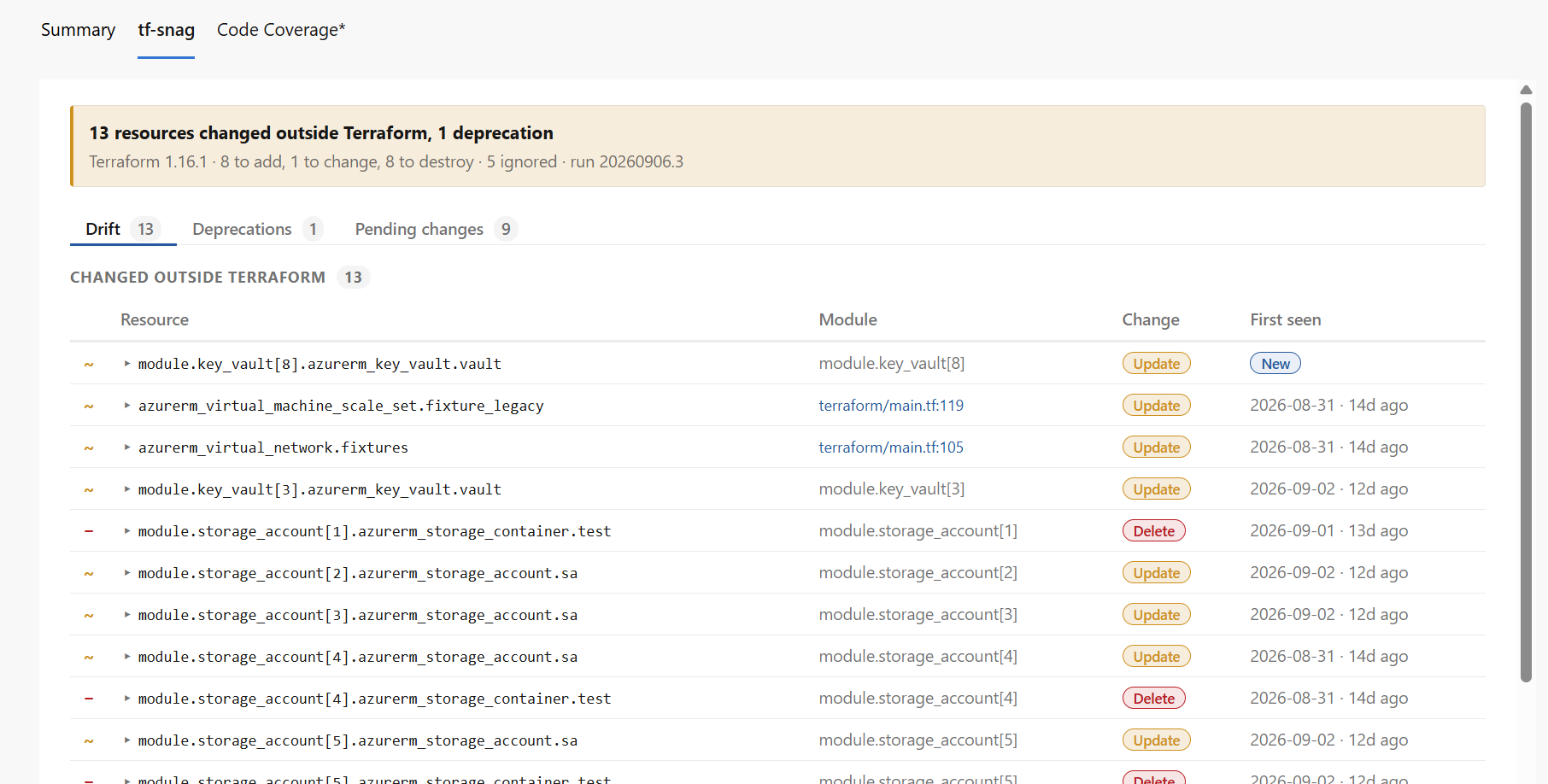
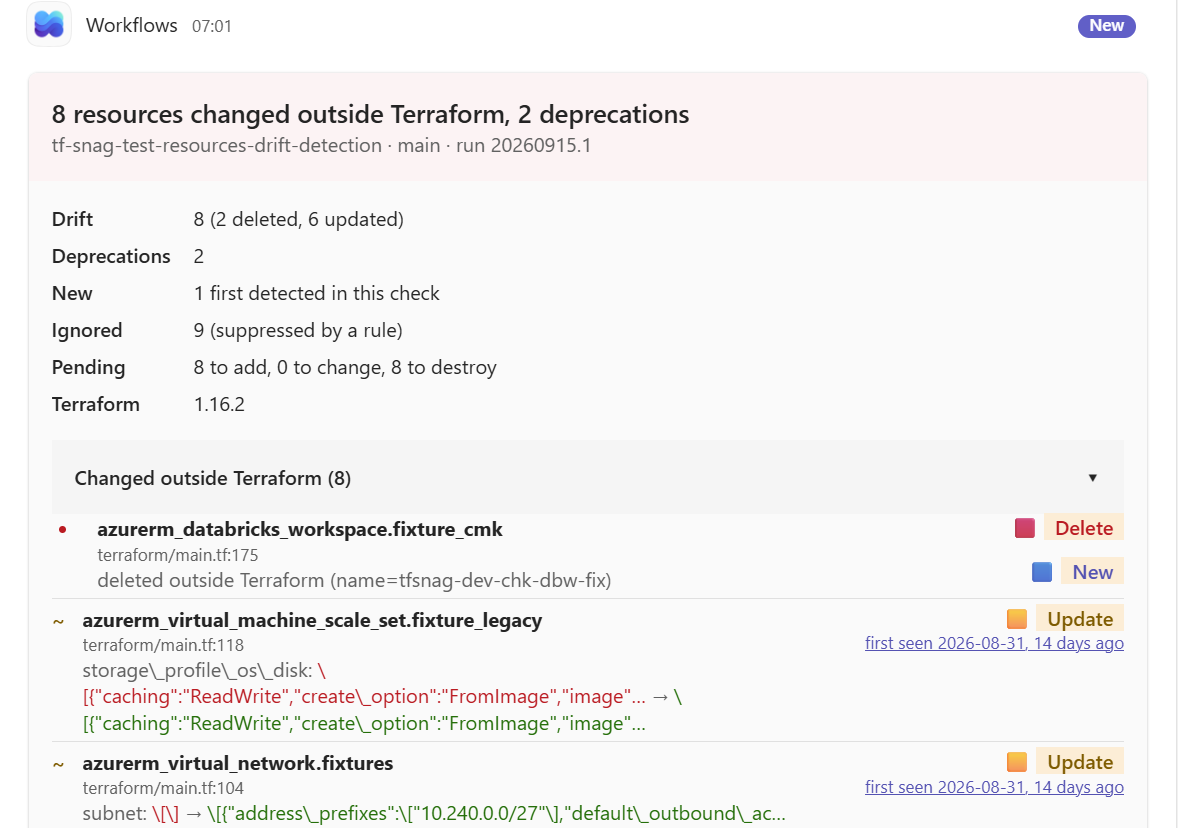
An Adaptive Card posted to a channel through a Power Automate Workflows webhook: a coloured verdict banner, the counts, and drift and deprecations folded into groups that expand in place, with new findings sorted to the top.
By default it only posts when something is new against the baseline, so a nightly run doesn’t re-announce the same drift every morning.
One work item per finding, tagged with the finding’s stable id, so Azure DevOps itself is the record of what’s been raised and no run opens a duplicate. By default only new findings get one, so day one isn’t fifty items. Items close when their finding goes away.
Ignoring a finding doesn’t close its item: tf-snag comments on it and leaves that call to a person. Start with dry-run, which checks the token and permissions and writes nothing.
![An Azure Boards task raised by tf-snag, titled 'Terraform drift: module.resource_group[6].azurerm_resource_group.rg changed outside Terraform', tagged drift, tf-snag and a tf-snag-id tag, with a description showing the resource, its source file and line, Update and No longer ignored badges, the first-detected date, and a tags attribute changing from null to a new value.](work-item-screenshot.png)
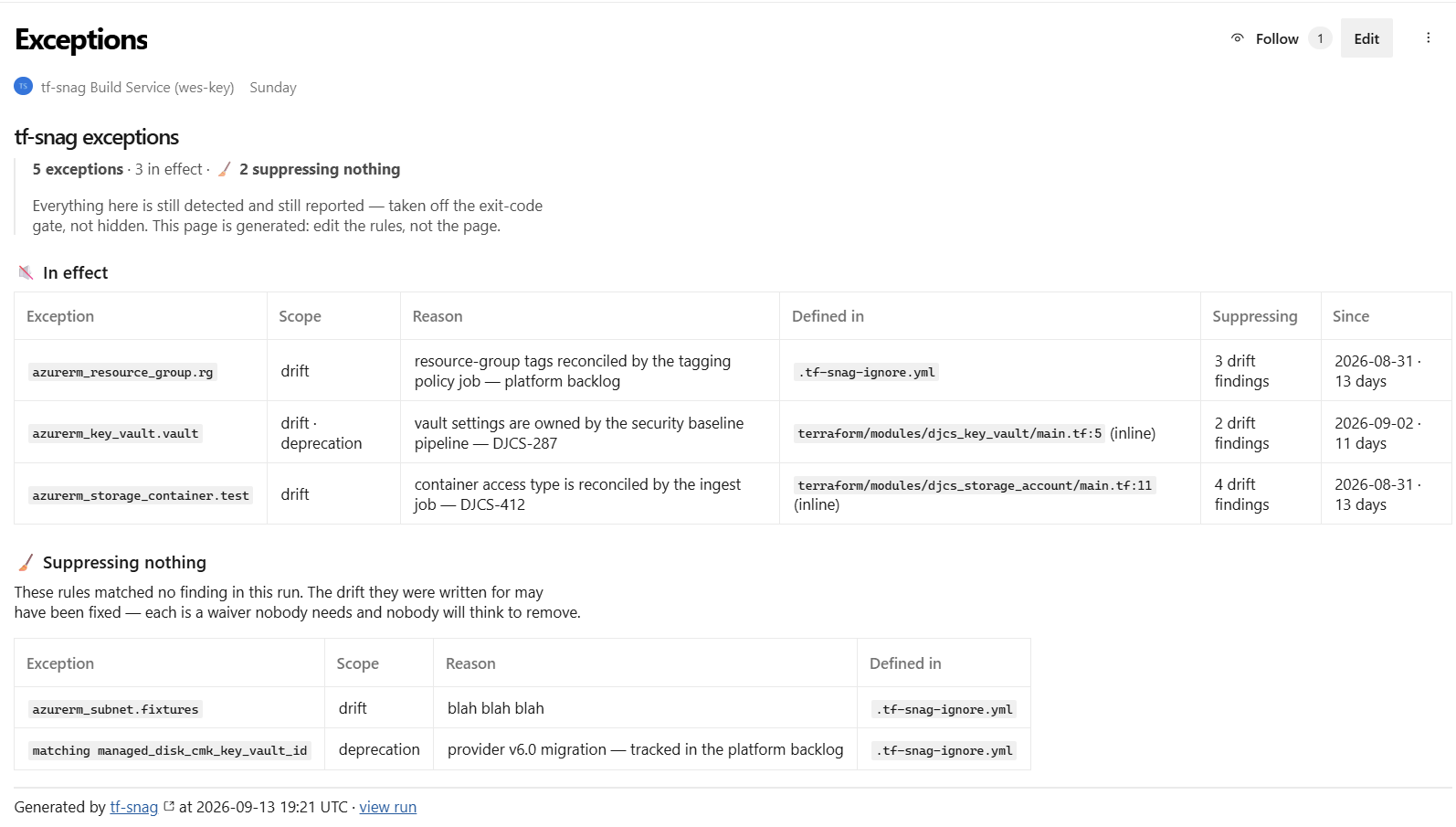
A generated wiki page listing every ignore rule: what it waives, why, whether it lives
in the ignore file or inline in the .tf, and what it’s suppressing
right now. Rules that have stopped suppressing anything get their own table, so stale
waivers get removed instead of living forever.
It only commits when something has changed, so the page history stays meaningful.
With the extension it’s two tasks: one installs the binary, one does everything else:
- script: |
    terraform -chdir=terraform plan -out tfplan -json | tee plan.jsonl
    terraform -chdir=terraform show -json tfplan > plan.json
  displayName: terraform plan

- task: tf-snag-install@0           # latest release, onto PATH

- task: tf-snag@0
  inputs:
    checks: all,retirements        # all is drift + deprecations
    planLogDir: terraform           # plan ran with -chdir=terraform
    retirementsFailWithin: 90       # only fail on what is close
    teamsWebhook: $(teamsWebhook)   # secret variable
    teamsNotify: new                # only when something appears
    workItems: dry-run              # off | dry-run | on
    adoType: Bug
    adoArea: Platform\Terraform
    wikiPage: /tf-snag/Exceptions   # the exceptions register
The baseline is the previous run’s tf-snag artifact, which the task publishes for you. Download it into $(Pipeline.Workspace)/prev and findings are tracked across runs. Publishing the register needs the pipeline to reference the wiki’s repository, and the build service needs Contribute on it.
Without it, a script step and a published artifact do the same job:
variables:
  TF_SNAG_VERSION: v0.1.0

steps:
- script: |
    # public repo, so gh needs no token; a curl to the
    # release asset URL works just as well
    gh release download "$(TF_SNAG_VERSION)" --repo wes-key/tf-snag \
      --pattern tf-snag --output tf-snag
    chmod +x tf-snag
  displayName: Get tf-snag

- script: |
    terraform -chdir=terraform plan -out tfplan -json | tee plan.jsonl
    terraform -chdir=terraform show -json tfplan > plan.json
    ./tf-snag -check all,retirements \
      -plan plan.json -plan-log plan.jsonl -plan-log-dir terraform \
      -source "$(Build.SourcesDirectory)" \
      -format sarif -exit-code=false > tf-snag.sarif
  displayName: tf-snag drift check

- task: PublishBuildArtifacts@1
  inputs:
    PathtoPublish: tf-snag.sarif
ArtifactName: CodeAnalysisLogs # the Scans tab reads this| Surface | Needs | What you get |
|---|---|---|
| tf-snag tab | the extension | The whole run in one view: drift, deprecations, retirements and pending changes on their own tabs, first-seen dates, ignored findings and their reasons, and the linked work item. The clearest surface. |
| Teams | a Workflows webhook | An Adaptive Card when a run turns up something new, with a link back to the run. |
| Work items | a token with Work Items (Read & Write) | One Azure Boards item per finding — one per retirement, not per affected resource — never duplicated, closed automatically when it clears. |
| Wiki | Contribute on the wiki repo | The exceptions register: every ignore rule, its reason, what it suppresses, and which rules have gone stale. |
| Run Summary | nothing | A markdown digest on the Summary tab (drift, deprecations, retirements, an Ignored section), posted with task.uploadsummary. The zero-install fallback. |
| Scans tab | sariftools.scans |
tf-snag’s SARIF in the generic third-party Scans tab, each finding linked to the line in your .tf, if you already standardise on it. |
| Tests tab | junit + PublishTestResults@2 |
Optional: one test per check, red on failure. |
| Build outcome | nothing | -exit-code=false plus a warning log issue marks the run SucceededWithIssues: visible, non-blocking. Drop the flag to fail the stage on any un-suppressed finding. |
terraform show -json output, or - to read stdin.terraform plan -json log and the directory its paths resolve against. This is what makes deprecation findings point at real files instead of nothing..tf line, and picks up inline # tf-snag:ignore comments.tf-snag.sarif. Diffs against it so each finding is stamped new / updated / absent with a first-seen date. That is the movement the tf-snag tab shows..tf-snag-ignore.yml (auto-discovered in the repo root) of accepted findings. Matched findings — drift, deprecations and retirements alike — stay in the report but don’t trip the exit code.$TF_SNAG_TEAMS_WEBHOOK, which keeps it off the command line), on new, findings or always.new findings or all of them, and close the ones that have cleared. -ado-dry-run shows what would change./tf-snag/Exceptions. -wiki-dry-run prints the page instead.90d). Everything outside it is still reported, marked as beyond the window.drift | deprecations | retirements | all, and text | json | markdown | junit | sarif. all is drift and deprecations; retirements are asked for by name (-check all,retirements), because they lean on a shipped catalogue rather than the plan alone.true: exit 2 on un-suppressed findings. Set false in CI when you want a warning, not a failed stage.Hosted or self-hosted agents both work; the binary is linux-amd64 or windows-amd64.
Add tf-snag to the pipeline you already run, and tonight’s drift, deprecations and retirement deadlines land in the run, the channel and on the board, with nothing new to adopt.